


Pulsar 19.0 Sneak Peek: Visualize Your Asset Hierarchy in the Field
June 3, 2026
Field teams often work across multiple assets, locations, and service relationships. Finding the right record can take time, especially on mobile or when connectivity is limited.
Pulsar 19.0 introduces a new way to view and interact with asset relationships. This update focuses on how teams access and act on asset data while working in the field.
At the center of this release is a new Asset Hierarchy experience built for mobile use with Salesforce.
The new Asset Hierarchy experience in Pulsar 19.0 gives field teams a faster way to understand asset relationships while working from a mobile device. The video below shows how users can navigate parent and child assets, switch between hierarchy views, access asset details, and move directly into related records from the field.
Common Questions
How can mobile teams view Salesforce asset hierarchies in the field?
Pulsar 19.0 introduces a mobile asset hierarchy that displays parent-child asset relationships in a single view. Users can securely search for assets, expand hierarchy levels, and access asset details while working offline.
What are the benefits of offline access to Salesforce asset data?
Offline access allows field teams to continue working when connectivity is limited. Pulsar stores Salesforce asset data on the device, allowing users to review records and access asset relationships in the field, which are automatically synchronized with the cloud when connectivity is restored. Users can quickly get context about the assets and make faster decisions.
A New Way to View Asset Relationships
Salesforce supports asset hierarchies that show how assets relate to one another, including parent-child structures.
Pulsar 19.0 brings that structure into a LocalFirst mobile view.
Users can now see asset relationships in a clear, interactive format. This helps teams understand context faster, find assets more quickly, and act without switching screens.
Tree View Built for Mobile Work
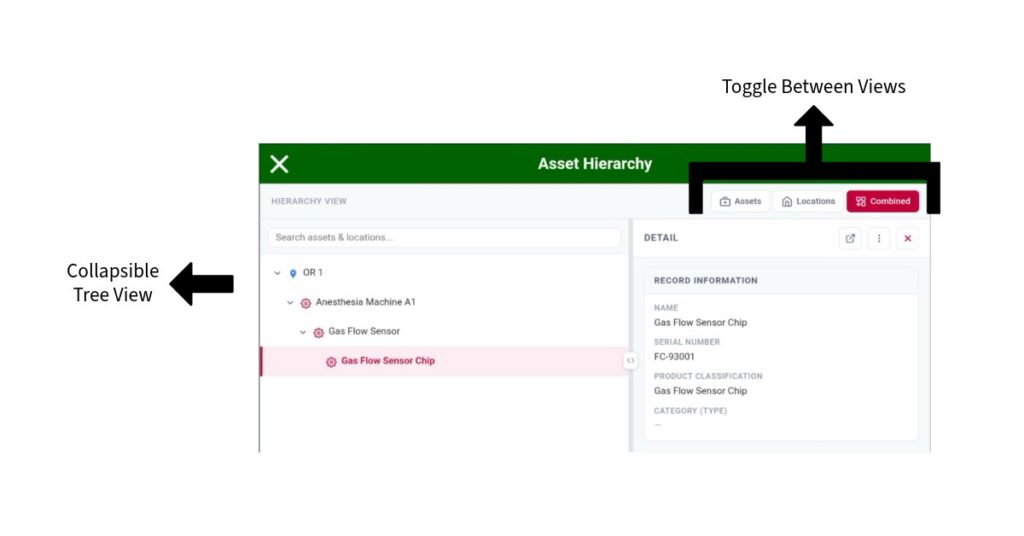
The new hierarchy uses a tree view that focuses on clarity and speed.
Users can:
- View parent and child assets in one place
- Expand or collapse levels to focus on what matters
- Search within the hierarchy to find specific assets
- Toggle views among asset-based, location-based, or combined
This structure reduces the time spent navigating between records. It also helps users understand how assets connect during service work.
Asset Detail Panel for Quick Action
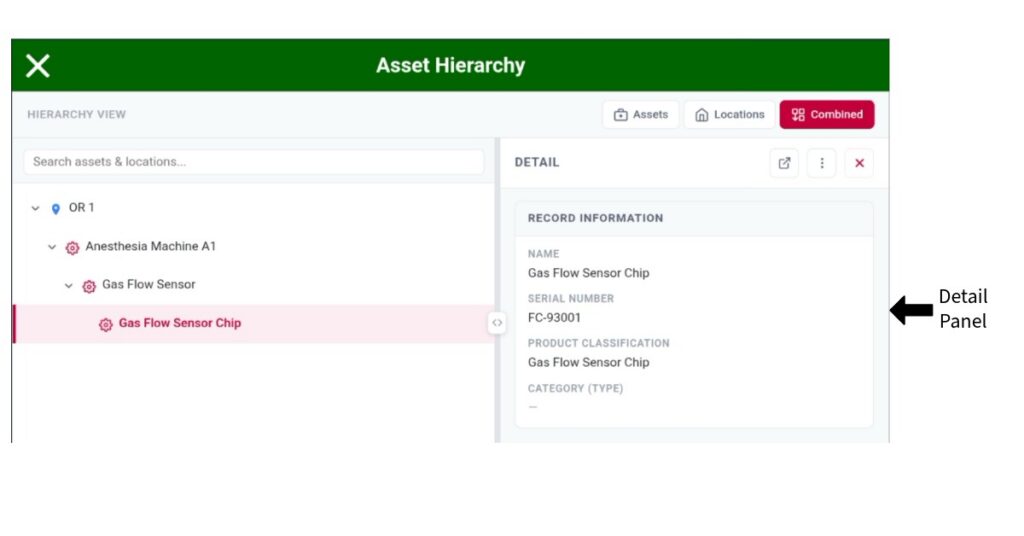
Selecting an asset opens a detail panel alongside the tree.
From this panel, users can:
- View key asset details
- Trigger quick actions directly from the asset
- Stay within the hierarchy while working
This keeps the work focus in one place. There is no need to jump between multiple screens to complete tasks.
Configurable Related Lists
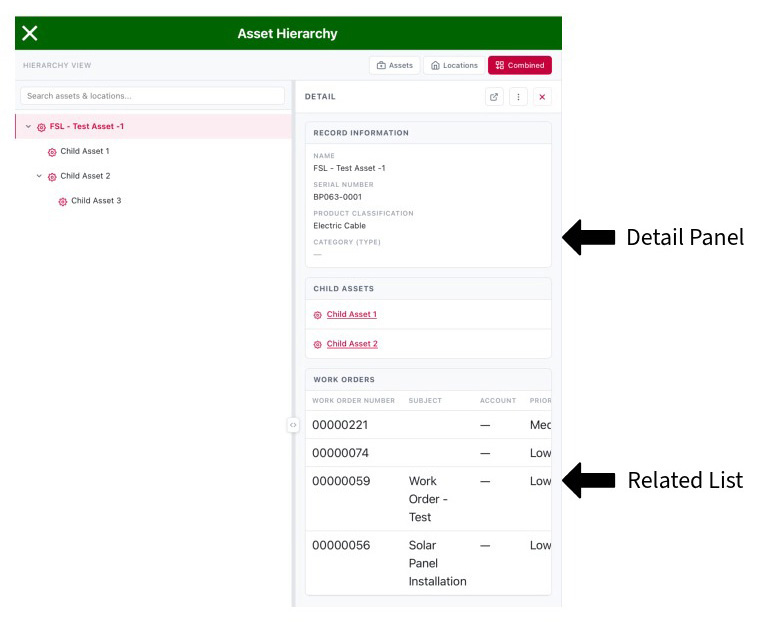
Administrators can extend the experience by adding related lists to the asset detail panel.
These links appear at the bottom of the panel and provide users with convenient access to related records associated with the selected asset.
This setup allows teams to tailor what users see based on their role or workflow.
Why This Matters for Mobile Teams
Accessing Salesforce data in the field often means working with limited time, limited screen size, and limited connectivity.
The new Asset Hierarchy in Pulsar 19.0 helps by:
- Reducing navigation steps
- Providing context for asset relationships
- Supporting faster decisions during service work
It aligns with how teams actually work, quickly moving between assets, locations, and service records throughout the day.
Looking Ahead
This is one of several updates in Pulsar 19.0 focused on improving Salesforce offline access and mobile usability.
The goal remains the same: helping teams work with Salesforce data wherever they are, without slowing down.
More details will follow as we get closer to the full release.
Follow Us for More Exciting Updates!
As we continue to innovate and enhance our software, we invite you to stay connected and be the first to know about future releases, product tips, and much more! Follow our blog to access in-depth articles, engaging tutorials, and expert perspectives that empower you to make the most of our software’s capabilities.
Connect with us on our social media channels to become part of a vibrant community of like-minded individuals. Share your experiences, provide feedback, and join the conversation as we collectively shape the future of software innovation.
Share on: